We live in a mobile-first world, and securing mobile applications is critical to our digital lives. The OWASP Mobile Top 10 list is ‘that north star’, the definitive list of the mobile security vulnerabilities. This comprehensive guide breaks down each OWASP Top 10 Mobile Risks (the latest revision 2024 update), providing clear explanations, real-world attack scenarios based on OWASP mobile guidelines, and actionable prevention strategies. Whether you’re a developer, security tester, or business owner, understanding the OWASP Mobile Security framework is crucial for protecting your users and data. We look into each vulnerability, from Insecure Authentication to Insufficient Cryptography, and explore how to implement robust mobile app security best practices to mitigate these mobile vulnerabilities. This article is your essential resource for mastering OWASP Mobile Security Testing and ensuring your apps are secure.
It’s also your checklist to ask for, but not limited to, when conducting a mobile application penetration test. It will ensure that the methodology covers the most risk areas, including testing for contextual issues that are specific to your business and development practices.
In the last five years, our lives have gone through massive changes with the rapid growth of mobile apps, which has become a vital part of our lives. Everything’s available at the tap of a button, from connecting with friends to work chat to paying bills and watching our house and kids (baby monitors). Lots of well-known applications such as WhatsApp, Tinder, Mediatek and their users have fallen victim to mobile security issues. Spyware such as Pegasus is making news every now and then, targeting governments and activities, underlining the importance of secure mobile applications and devices.
If your mobile apps require a third-party independent pen test, check our mobile pen testing services.
OWASP stands for Open Web Application Security Project. It is a non-profit foundation that works to improve the security of applications/software by providing guidelines through local and global conferences and open-source software projects such as the OWASP mobile top 10 projects, web application projects, API security projects, serverless computing projects, and more.
Our other OWASP popular posts related to web application and API security risks, attack examples, and remediation are:
Does OWASP apply to mobile apps?
Yes, the OWASP applies to mobile applications (apps) and, to an extent, the underlying mobile device.
As stated above, the OWASP checklist provides security guidance for web applications and API security. OWASP Mobile Top 10 is a mobile security project focused on highlighting security vulnerabilities in mobile apps and remediation strategies to mitigate the associated risk. This top 10 list highlights technical threats and answers how open mobile risk impacts businesses.

What is the OWASP mobile project?
OWASP mobile project is a centralised resource for app developers and the security team to build and maintain a secure mobile application and mobile device. The project frequently updates the latest attack trends and attack vectors to provide a development control to reduce the attack impact and likelihood of occurrence and exploitation. It includes a testing guide, OWASP mobile top 10 list, cheat sheets and other resources for secure development.
Mobile application architects use the OWASP baseline to design secure app patterns; app developers use it to ensure secure coding understanding, and security testers use it to ensure security in the foundation and arena or mobile internal and external environment.
This community-driven OWASP mobile project is an excellent resource for developers and businesses to create secure mobile apps and configure mobile device security by listing down the critical and top 10 mobile risks that have impacted mobile security over the years.
This article elaborates on all of the mobile vulnerabilities, with attack examples and remediation guidelines to mitigate the risk. The development team can utilise the checklist listed below to produce a secure application from the start.
What are the OWASP mobile top 10 risks?
Let’s look at the Top 10 OWASP mobile security vulnerabilities:
- M1: Improper Platform Usage
- M2: Insecure Data Storage
- M3: Insecure Communication
- M4: Insecure Authentication
- M5: Insufficient Cryptography
- M6: Insecure Authorization
- M7: Client Code Quality
- M8: Code Tampering
- M9: Reverse Engineering
- M10: Extraneous Functionality
Resolving the OWASP top 10 mobile vulnerabilities does not mean your mobile apps are immune to cyber attacks. Instead, OWASP mobile security risks and prevention methods serve as a strong security baseline for the organisation and development team to design and develop the secured application as far as possible. Testing your application beyond these best practices checklists with other cybersecurity assessments for better security is essential.
OWASP Mobile Security Testing Guide (MSTG) and Verification (MASVS)
OWASP Top 10 Mobile Security Testing Guide (MSTG)
The OWASP mobile top 10 security testing guide is a standard for mobile applications that addresses tools, techniques, and processes with test cases to secure mobile apps. OWASP Top 10 offers a mobile security testing guide (MSTG), mobile app security requirements, and verification for better mobile security.
OWASP MSTG guide is an extensive manual for mobile app testing, detailing controls verification and reverse engineering tests. The mobile security testing guide has a security testing manual for iOS and Android security testers, including the following.
- Mobile platform internals
- Security testing in the mobile app development lifecycle
- Basic static and dynamic security testing
- Mobile app reverse engineering and tampering
- Assessing software protections
- Detailed test cases that map to the requirements in the MASVS
OWASP MASVS (Mobile App Security Requirements and Verification)
The OWASP Mobile Application Security Verification Standard (MASVS) is, as the name implies, a standard for mobile app security. It can be used by mobile software architects and developers seeking to develop secure mobile apps and security testers to ensure verification of test results.
The OWASP mobile application security verification standard is an open-source framework that defines and assesses security for mobile apps, covering various app risks and security controls. This helps establish baseline security requirements for mobile apps.
Mobile App Security Checklist based on OWASP MSTG & MASVS
The following best practices and security risks checklist are based on the MSTG and MASVS, with test cases for each requirement.
Why is OWASP Mobile Top 10 Important for Mobile App Security?
We live in the mobile-driven world, the OWASP Mobile Top 10 isn’t just a helpful list; it’s a critical foundation for building secure mobile applications and demonstrates your adherence to the globally recognised checklist. Its importance stems from several key factors that directly impact developers, security teams, and businesses:
- Prioritizes Critical Risks: The OWASP Mobile Top 10 distills a vast landscape of potential mobile app vulnerabilities down to the ten most impactful security risks. This prioritization helps teams focus their limited resources on addressing the threats that pose the greatest danger to their applications and users. Instead of being overwhelmed by countless potential issues, developers can use this list as a starting point and a core security baseline.
- Industry Recognized Standard: Developed by the Open Web Application Security Project (OWASP), a globally respected non-profit, the Mobile Top 10 carries significant industry weight. Referencing and adhering to this list demonstrates a commitment to mobile security best practices and provides a common language for developers, security professionals, and stakeholders to discuss and address mobile vulnerabilities. It’s a recognized benchmark for security audits and penetration testing.
- Actionable Guidance & Remediation: The OWASP Mobile Top 10 isn’t just a list of problems; it’s accompanied by valuable resources like the Mobile Security Testing Guide (MSTG) and Mobile Application Security Verification Standard (MASVS). These resources offer practical guidance, testing techniques, and remediation strategies for each vulnerability category. This empowers development teams to understand and mitigate the risks throughout the mobile app development lifecycle (SDLC).
- Addresses Real-World Threats: The list is based on real-world attack data, vulnerability analysis, and the collective expertise of the OWASP community. This means the OWASP Mobile Top 10 reflects the actual threats that mobile applications face today, not just theoretical risks. Businesses can proactively defend against the most common and dangerous attack vectors targeting mobile users and data.
- Facilitates Secure Development Lifecycle: Integrating the OWASP Mobile Top 10 into the SDLC promotes a “security-by-design” approach. By considering these risks from the initial planning and design phases, developers can proactively build security into their apps, rather than bolting it on as an afterthought. This proactive approach is far more effective and cost-efficient in the long run.
- Continuously Updated & Evolving: The mobile threat landscape is constantly changing. The OWASP Mobile Security Project actively monitors emerging threats and periodically updates the Top 10 list to reflect these shifts. This ensures that the guidance remains relevant and up-to-date, helping organizations stay ahead of the curve in mobile security. Regularly reviewing the latest version of the OWASP Mobile Top 10 is crucial for maintaining a strong security posture.
Basically (I use this word a lot!), the OWASP Mobile Top 10 provides a structured, practical, and industry-backed framework for understanding and mitigating the most critical security risks in mobile applications. It’s an indispensable resource for anyone developing, securing, or managing mobile apps.
Understanding Each OWASP Mobile Top 10 Vulnerability (M1 – M10)
M1: Improper Platform Usage
Improper Platform Usage, the top vulnerability in the OWASP Mobile Top 10, arises from using platform features like Android Intents or iOS Touch ID. This section explores the risks of improper platform usage in mobile app security and how to prevent it. Insecure implementation and development practices provide multiple attack avenues to the attacker, such as API call exposure, misuse of iOS Touch ID or Android Intent, etc.
Android intents, better known as Intent and Intent filters, are responsible for communication between different components such as apps, services, etc. A direct threat linked with Android intents is data leakage. Data leakage is a situation where data is disclosed due to errors, misconfigurations, or other flaws, but not related to a data breach situation (unauthorised access of sensitive data).
By identifying code flaws, the attacker can access the application and inject malicious commands to steal data and compromise other application features. Likewise, incorrect storage of iOS keychains, such as session keys stored in the local app or publicly marked Android Intent, can expose confidential user data or permit unauthorised access.
How to prevent improper platform usage?
This vulnerability can be prevented by addressing the remediation on the server-side features and the following steps.
- Follow the platform development guidelines and best practices for features such as Android Intent, Touch ID, iOS keychain, etc.
- Implement secure coding and configuration for mobile app development and server-side hardening.
- Restrict apps from user data transmission with each other.
- Limit file permissions and access.
- Enforce encrypted data storage
M2. Insecure Data Storage
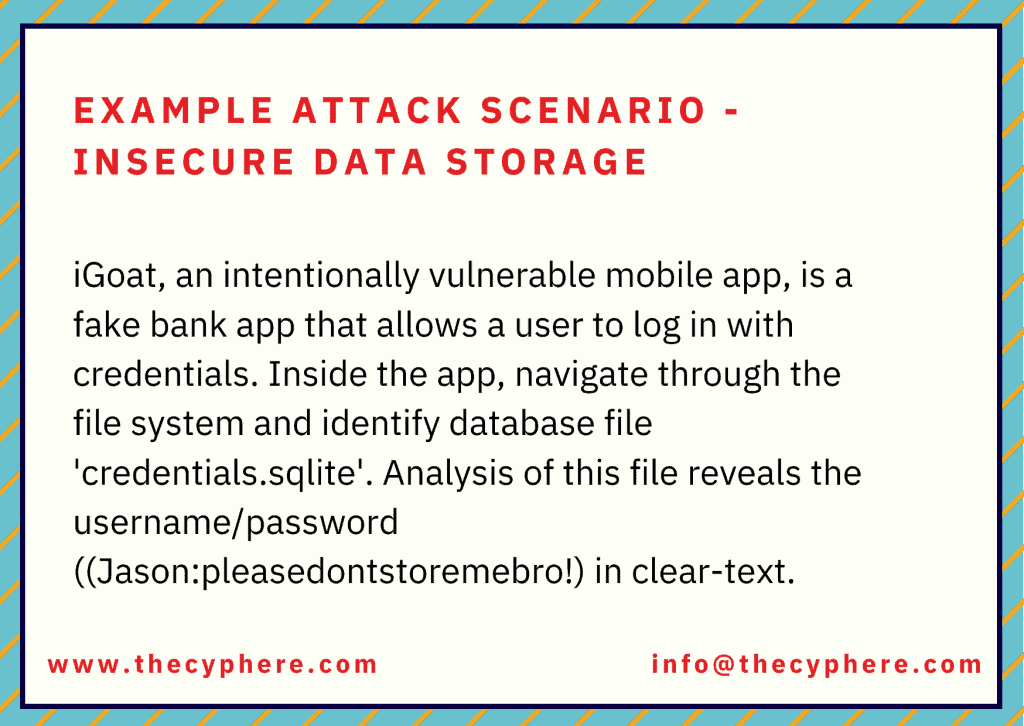
Insecure data storage is the most threatening risk to many mobile apps, web apps, IoT devices, etc. Almost every application stores user data, known as PII (personally identifiable information). If it gets into the hand of any ill-intentioned attacker, that data can create many consequences ranging from fraud, data theft, reputational damage, regulatory violation, etc. Insecure data storage must be improved with storage policies and features that are secure and configured correctly. It would ensure that the sensitive data cannot be accessible to any other unauthorised person or application.
Jailbreaking or rooting devices that run apps outside of the OS framework can provide the attacker with access to sensitive data, and broken cryptography or poor encryption libraries might expose sensitive data or let the attacker access it. In contrast, social frameworks such as analytics, advertising, cookies, and active sessions have many user information stored in them. If exploited, they can expose a lot of data to the attacker.
If the attacker or infuses malware in the device, repackages the app or gains physical access to the device, he would then assess the device via freely available software and access the application directories to gain PII PHI, financial or any other information.
How to secure data storage?
- Enforce data encryption
- Implement authorised and authentic access mechanism for mobile app
- Restrict access to storage files on mobile apps
- Secure code practices against buffer overflow, cookies object, data logging and caching through appropriate protection measures.
M3. Insecure Communication
Unencrypted and clear text data transmission provides an open path to an attacker to steal data due to insecure communication measures. Anyone can intercept such insecure data communication by compromising Wi-Fi, installing malware or by a man-in-the-middle attack.
Insecure Wi-Fi networks can be used to gain access to corporate assets to steal sensitive data utilised for identity theft and fraud by cybercriminals. Similar to data in transit, it is important to use strong encryption measures to store important data (based on data classification levels) for the business.
How to prevent insecure communication?
- Implement SSL/TLS certificates for secure communication
- Use trusted and signed CA certificates.
- Deploy industry-standard encryption protocol and best practices.
- Transmit sensitive data, sessions token, etc. to the web service or the backend API
- Refrain from sending session user ID with SSL session token
- Encrypt data before giving out to the SSL channel (if possible)
- Apply SSL/TLS to transport channels that the mobile app will use to transmit sensitive information, session tokens, or other sensitive data to a backend API or web service
M4. Insecure Authentication
Insecure authentication vulnerability means that the attacker bypasses the security controls responsible for exploiting authentication control vulnerabilities, such as improper validation, executing backend API service requests without a token, bypassing weak policies, etc. Unintended data disclosures are sometimes the direct result of insecure authentication or a lack of platform security controls.
Insecure authentication will drastically impact the application and communication if an attacker enters confidential information or privileged access.
How to prevent insecure authentication?
Implement MFA, complex and robust password policies.
- Match the web app security protocols with the mobile application in terms of authentication mechanism
- Deploy server-side authentication mechanism
- Do not store passwords on local devices
- If local storage is necessary, ensure the encryption key is derived from the user’s login credentials and enforce the process to authenticate application data.
- Refrain from persistent authentication (remember me) functionality
- Ensure data availability after successful authentication
- Give red signal or caution sign whenever user go for remember me an option for future authentication
- Enforce device-centric authentication so no one can access the app data on another device
- Ensure protection against binary attack
M5. Insufficient Cryptography
Mobile apps use and store various sensitive data that needs to be protected with solid encryption, but if the cryptography mechanism is flawed or weak, it loses its purpose. Insufficient cryptography controls leads the attacker to access proprietary, sensitive and personal information such as user name, location, credit card details, security numbers, PII, PHI, etc. Likewise, an outdated crypto algorithm such as RC2, MD4, MD5, SHA1 or the wrong implementation of cryptographic measures, let the attacker quickly reverse engineer or bypass the built-in encryption code algorithm.
An attacker can also assess the cryptographic keys and codes built into the operating system through jailbreaking or rooting the device by getting the decrypted codes from memory. Regardless of how strong cryptography is, if the attacker successfully gains codes from memory, he would perform static and dynamic analysis using the debugger or compiler.
Apart from the abovementioned threats, malware is also a significant threat in exploiting insufficient cryptography vulnerability. The attacker can decrypt the data while capturing the network traffic or injecting malware on the device with access to encrypted data.
How to prevent insufficient cryptography?
- Avoid storing data on the device where possible.
- Implement robust crypto algorithm as directed by NIST
M6. Insecure Authorization
Insufficient authorisation allows malicious intruders to access and execute privilege escalation to steal sensitive information and damage the system and infrastructure. By exploiting insecure direct object reference (IDOR) vulnerabilities, the transmission of LDAP roles, navigating vulnerable access points, or identifying open and hidden endpoints, the attacker enables himself to access files, databases, and accounts.
An insecure authorization that fails to verify the user and grants permission as a legitimate account holder is the significant threat of insecure authorisation vulnerability in OWASP mobile top 10 list. Poor authorization is equally a security risk across web applications and APIs.
Example attack scenario – Insecure authorization shown below:
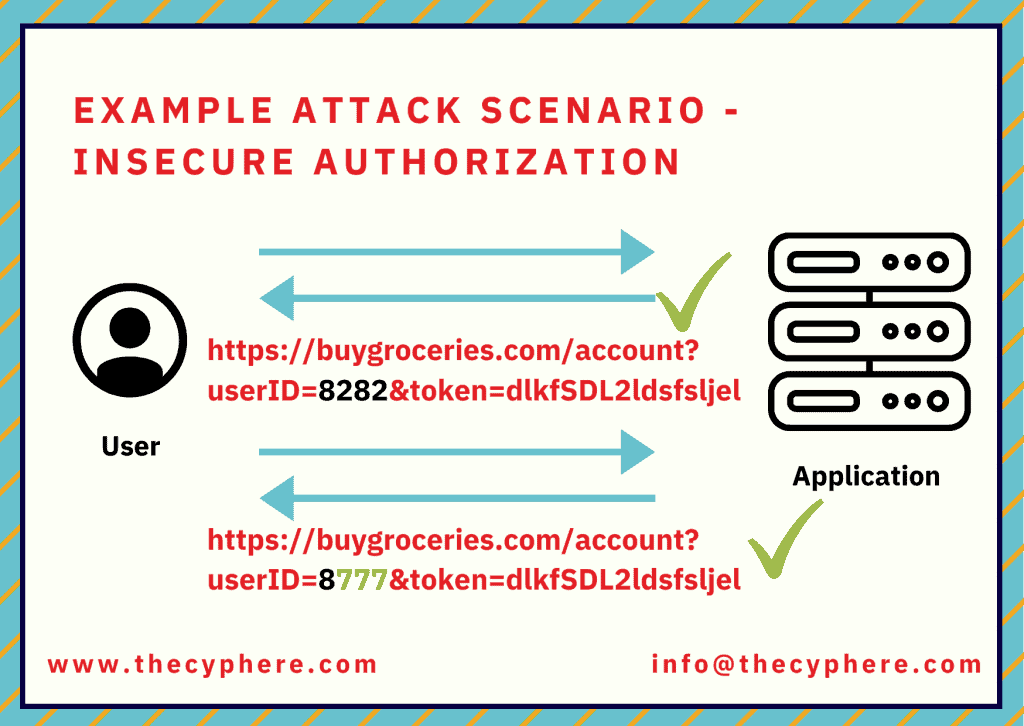
A user submitting an API request to backend rest API includes a userID and an OAuth token. The user includes their user ID and access token as a request header, and the application verifies the bearer token without validating the user ID associated with the bearer token. Due to this situation, the user can change the user ID and obtain other user-submitted information as part of this API request.
How to prevent insecure authorisation?
- Refrain from granting roles and permission coming through a mobile device
- Independently verify and match the identity through backend codes
M7. Client Code Quality
Client code vulnerability occurs as a result of poor programming practices in mobile application development. Such flaws present in the codes lead the attacker to exploit the client-side and server-side flaws by tampering with the codes, crafting malicious input to function call for code executions. These poor code flaws (memory leaks, buffer overflows) are present on the client-side and distinct from the server-side coding, which leads to exploiting the code weaknesses such as buffer overflows, remote code execution, memory leaks and data leakage.
Other than these, various apps depend upon third-party libraries and features for their functionality, which are often not considered. Thus, it offers an avenue for attackers to exploit vulnerabilities by injecting malicious code to change the app’s behaviour, sensitive data theft, hijacking device computing power for crypto mining, etc.
Example attack scenario as taken from OWASP:
include

 int main(int argc, char **argv)
 {
    char buf[8]; // buffer for eight characters
    gets(buf); // read from stdio (sensitive function!)
    printf("%s\n", buf); // print out data stored in buf
    return 0; // 0 as return value
 }
The user of the gets function in the above code should be avoided due to a buffer overflow vulnerability. This is most likely to come up during static analysis code checks.
How to prevent client code quality risk?
- Enforce secure coding practices.
- Usage of static code analysis tool
- Consistent code pattern
- Avoid simple logic codes
- Hold session until the user is authenticated via MFA, OTP, etc.
- Reliable and secure integration of third-party libraries
- Create third-parties libraries list to update and patch the third-party promptly
- Test buffer overflow, memory leak, remote code execution issues via an automated tool
- Enable permission flag on the content provider to prevent unauthorised access.
M8. Code Tampering
By taking advantage of code tampering vulnerability, the attacker modifies and alters the code to create a bogus version of the mobile application and trick users into installing it via phishing and other social engineering scams. The attacker typically modifies the app’s binary to inject malicious code, install a backdoor, etc., on the application hosted in the third-party app stores.
This can be done by directly changing the application package’s core binary or resources within the application package or redirecting or replacing system APIs to intercept and execute malicious codes.
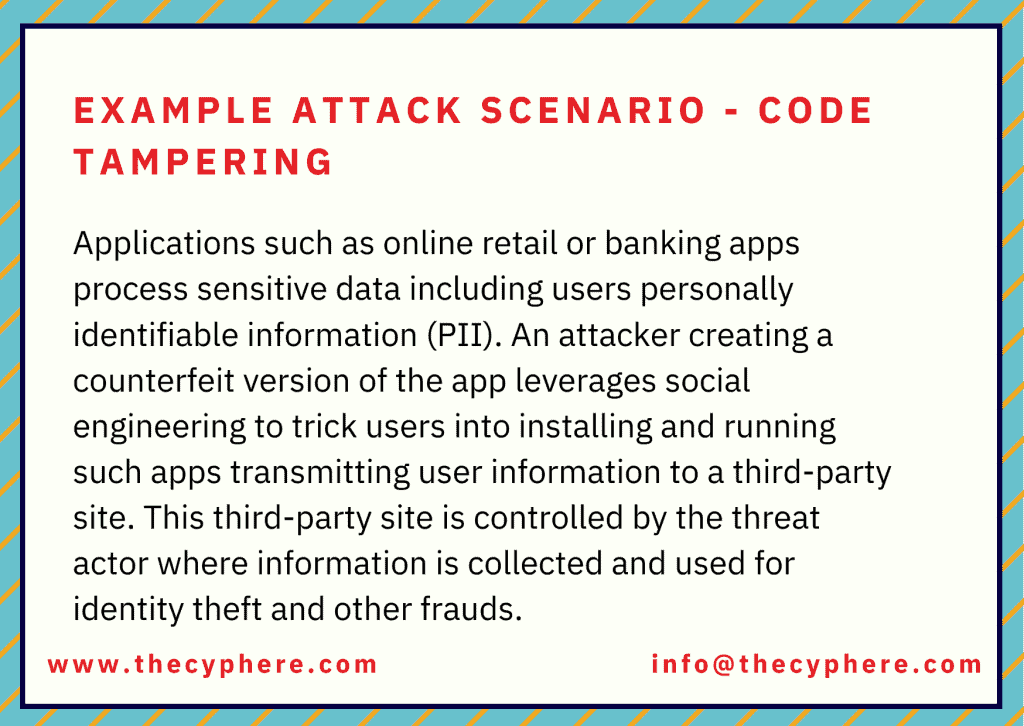
Once the application has a forged signature and backdoor, the attacker publishes the modified version on the app store as a legitimate application. The code tempering flaw leads to malware infusion, revenue loss, reputational damage, identity and data theft, etc.
How to prevent code tempering risk?
Focus on Android root detection. There are several ways to detect a rooted Android device.
- Check for test-keys
- Check to see if build.prop includes the line ro.build.tags=test-keys indicating a developer build or unofficial ROM
- Check for OTA certificates.
- Check to see if the file /etc/security/otacerts.zip exists
- Check for several known rooted apk’s
- Check for SU binaries such as /system/bin/su, /system/xbin/su, /sbin/su, /system/su, /system/bin/.ext/.su,
- Attempt SU command directly.
- Attempt to run the command and check the current user’s id; if it returns 0, then the su command has been successful.
- Enable the app to identify code integration and react accordingly (i.e., report to the server or shutdown)
- Implement anti-tamper techniques such as validation methods, checksum, code hardening, digital signatures.
M9. Reverse Engineering
Reverse engineering refers to disassembling the product to analyse the composition and core concept of development. Generally, all applications are susceptible to reverse engineering, some are more, and some are less. Attackers decompile the application to perform code analysis, identify the connection and information about the backend server, ciphers, encryption algorithm to launch an attack to steal intellectual property, code modification.
Once they know how the app operates and is designed to behave, they modify it via tools such as IDA Pro, Hopper and other binary inspection tools to change the application behaviour by inserting codes and changing the functionalities.

In addition, reverse engineering significantly impacts the server’s security and capability to detect jailbroken and rooted devices.
How to prevent reverse engineering risk?
To prevent reverse engineering attacks, verify whether your application can be decompiled. A reverse engineer works upstream from the usual development practices to discover an application’s logic and inner functionalities. For this, run your application in the debugging tools used by attackers. Otherwise, you may do the following to prevent your application from reverse engineering.
- Implement good, strong obfuscation
- Deploy metadata code obfuscation
- Use C or C++ for application development as they both offer libraries to protect runtime changes.
- Separates the source code block and controls the code flow
- Enforce binary packaging to prevent the attacker from directly code de-compilation
- Implement a mechanism to avoid the code debugging from tools such as IDA Pro and Hopper.
M10. Extraneous Functionality
Extraneous functionality refers to an element such as configuration files, log files, test codes, admin end-points, backend system functionalities that any attacker can leverage to perform any cyber attack. Such weaknesses do not require the attacker to run on the user end; they can usually see the flaws directly within their local environment.
This OWASP mobile top 10 list risk is often accidentally exposed by the developer without the end-user interface. However, the potential attacker can use it to gain access to app features such as database information, user details, user permissions, API end-points or might disable MFA or other security measures.
An example attack scenario for Extraneous functionality would be exposing an administrative endpoint. Developers sometimes include a hidden interface within the mobile application that would display an administrative dashboard.
Another example would be enabling debug flag in a configuration file that leads to unnecessary exposure of detailed trace and log files. This is helpful content for a threat actor looking to find ways to enumerate backend objects.
How to prevent extraneous functionality risk?
It is crucial to remember the automated tools cannot detect the vulnerabilities that can be chained up with other security flaws. It is important to perform a manual source code review to detect bugs in the codes.
Along with manual code analysis, make sure to check the following
- Examine the application configuration setting to identify hidden switches
- Examine the API end-points and log statement to ensure they are not publicly available or exposed by OEMs
- Either the accessible API end-point of the app is well-documented or not.
- Does the log have any content related to backend server processes, privileged accounts?
There are multiple areas to consider while developing a secure mobile app. These include secure coding practices and design areas to avoid unauthorised access, strong authentication methods, secure encryption practices such as encryption algorithms and keys, and fixing broken cryptography or other issues.
Using intentionally vulnerable mobile apps is popular amongst security professionals to learn about mobile apps weaknesses and exploitation methods. Some of these are:
- iGoat iOS
- owasp-mstg
- Damn Vulnerable Hybrid Mobile App
- Android InsecureBankv2
- SecurityShepherd and more.
Conclusion
Owasp mobile security provides a good overview of different mobile security threats, including related mobile device issues and threats. You can use this as an internal security baseline for mobile application development practices. Over time, you should update it with your internal processes to ensure secure SDLC practices are inherent to your development and deployment processes.
Get in touch for your mobile security concerns or discuss your mobile application security roadmap.