Mobile application penetration testing is a process of identifying and exploiting vulnerabilities in mobile applications. It uncovers the vulnerabilities in Android, iOS, and cross-platform apps. Over 70% mobile applications have vulnerabilities.
The process of mobile application penetration testing is initiated with extensive reconnaissance and threat modelling to learn the architecture of the application and the possible attack surface. The testers then proceed to static application security testing (SAST), where they examine the application’s code or binary without executing it. They scan the application source code or binary to find the usual vulnerabilities such as poor data storage, hard-coded passwords and poor encryption systems, as stated by Altulaihan and Alismail, titled “A survey on web application penetration testing”, published in 2023.
The tools used in mobile application penetration testing are MobSF and dynamic proxies such as OWASP ZAP or Burp Suite Professional. These tools identify and report all vulnerabilities in mobile applications, their impact, and recommend remedial action plans to developers, as noted in the Nutalapati title, “Automated Security Testing for Mobile Apps: Tools, Techniques, and Best Practices,” published in 2023.
What is Mobile Application Penetration Testing?
Mobile application penetration testing is the process of identifying vulnerabilities in mobile apps on Android and iOS platforms to mitigate the risk of data breaches. Mobile application penetration testing is a systematic, ethical procedure of discovering security vulnerabilities in mobile applications through static and dynamic analysis, utilising specialised tools, as described by Messier, titled “Learning Kali Linux: Security testing, penetration testing & ethical hacking”, published in 2024. It’s very necessary that organisations test the mobile application once a year and before launching it.

The components of mobile application penetration testing are static, dynamic and network communication analysis, data storage, authentication, and reverse engineering. The first mobile app penetration testing was done in the 1960s for Government and military purposes.
The common examples of mobile app penetration testing are using static analysis to find hard-coded credentials vulnerabilities in mobile apps, and using the Burp Suite tool to secure API Keys and passwords, according to Alhamed & Rahman, titled “A systematic literature review on penetration testing in networks: future research directions”, published in 2023.
How does mobile application Penetration Testing work?
The principle behind mobile application penetration testing is to simulate attacks to detect vulnerabilities in the code, data storage, and communication of a mobile app to the system.
The penetration testing of mobile applications involves detecting and remediating security vulnerabilities, protecting user data, and ensuring the app’s ability to withstand an attack. Mobile application penetration testing aims to replicate cyberattacks to identify vulnerabilities in an application before they can be exploited by malicious individuals, as described in Roshanaei’s 2024 article, “Enhancing mobile security through comprehensive penetration testing.”
What platforms are used for mobile application penetration testing?
Mobile penetration testing platforms refer to the two operating environments, Android and iOS, that security testers use to assess, identify, and validate vulnerabilities in mobile applications.
Listed below are the 2 mobile application penetration testing platforms.
- Android application penetration testing: Android penetration testing is conducted using both open-source and commercial tools, with MobSF, Frida, and SEBASTiAn platforms. Emulators, simulators and vulnerable applications are designed to enable security tests and are used in testing environments to achieve a thorough security test.
- iOS Application penetration testing: The penetration testing of iOS applications is based on Windows, Linux, or macOS platforms. In the iOS penetration testing, a jailbroken phone is necessary to operate security tools such as Frida, network analysis, Wireshark and Burp Suite, as stated by Francesco Pagano et al, title “ A static and extensible black-box application security testing tool for iOS and Android applications”, published in 2023.
How to perform mobile application Penetration testing?
Mobile app penetration testing involves Planning, static and dynamic analysis, Vulnerability Assessment, Exploitation reporting and Remediation.
Listed below are the 12 steps to perform mobile application penetration testing.
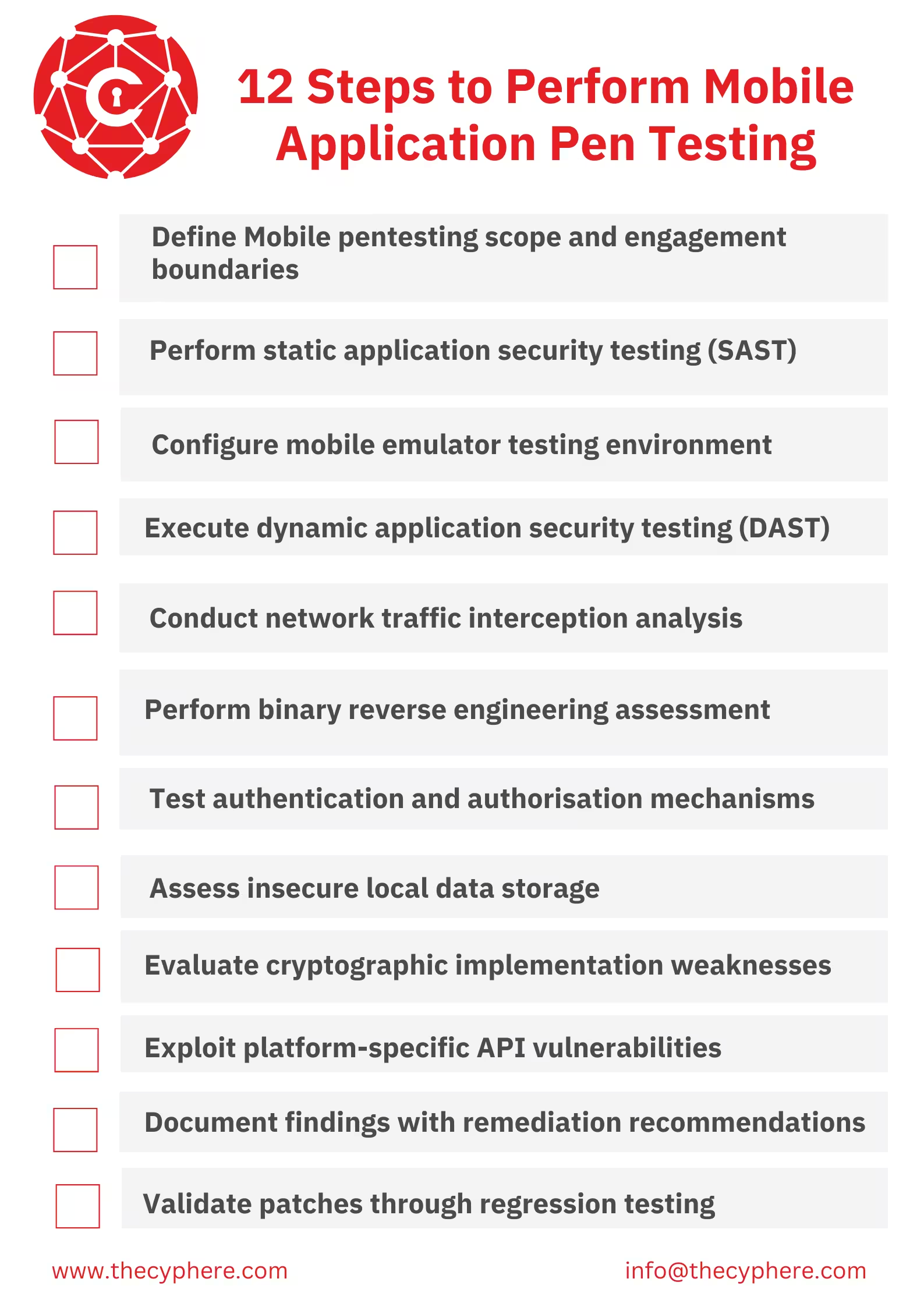
1. Define Mobile pentesting scope and engagement boundaries:
Mobile penetration testing scope is an official, comprehensive document with the specifications of limits, scope, systems, and elements of mobile application security testing. The mobile pentesting scope determines all pre-plan activities for mobile penetration testing, such as what is tested, including the mobile platforms (Android or iOS), versions of the application, features, and backend APIs. The tester tests accounts, API documentation and permissions needed and identifies the threat mode.
2. Perform static application security testing (SAST):
SAST assists in identifying problems earlier as the mobile application is being developed. The mobile applications (APK or IPA) are analysed without being executed. This involves decompiling the application to scan the source code and code settings. The tester searches for hard-coded credentials, API keys, insecure settings, incorrect permissions, poor use of encryption, and old debugging code.
3. Configure mobile emulator testing environment:
The tester establishes a testing lab using either emulators (like Genymotion or Corellium) or physical devices. These devices must be rooted (Android) or jailbroken (iOS) to allow full access to the application’s file system and memory.
Next, the tester configures the network to route traffic through proxy tools like Burp Suite or OWASP ZAP. This allows them to intercept and inspect HTTP/HTTPS requests. For deeper analysis, they may also install Dynamic Instrumentation tools (like Frida) to hook into the application and manipulate its behaviour at runtime.”
4. Execute dynamic application security testing (DAST):
DAST involves testing and examining the behaviour of the mobile application in actual use. Testers test everything to identify weak points that are only revealed when the application is running. This stage identifies weak API invocations, broken authentication, weak data processing, logic and runtime leakages.
5. Conduct network traffic interception analysis:
Conducting network traffic interception analysis involves monitoring all traffic flowing between the mobile application and the backend servers. The tester intercepts HTTP and HTTPS requests using proxy tools like Burp Suite or OWASP ZAP.
6. Perform binary reverse engineering assessment:
Binary reverse engineering assessment in mobile app penetration testing is performed to know how it is written, what you have never seen, or which secrets were concealed within it. The tester uses APK, JADX and frida tools to decode resources, decode code, or analyse libraries. Search for hard-coded secrets, business logic, proprietary algorithms, and security mechanisms. It also verifies the presence of protection used by the app, like obfuscation and anti-debugging. This assists in determining how hackers manipulate or clone the app.
If the application implements SSL Pinning, the tester must first use instrumentation tools (like Frida or Objection) to bypass these checks. Once traffic is intercepted, the tester assesses the implementation of encryption, checks for Man-in-the-Middle (MitM) vulnerabilities, and verifies that no sensitive data is transmitted in plaintext. This analysis detects insecure API behaviours and transport layer weaknesses.
7. Test authentication and authorisation mechanisms:
Testing authentication and authorisation mechanisms in the mobile app identifies the old user credentials. The penetration tester hacks the past authentication systems, using old tokens, gains higher-level privileges, or uses an API endpoint at the administrative level. The penetration tester inquires whether the server-side authorisation is appropriately used to control the actions according to the roles to prevent unauthorised access.
8. Assess insecure local data storage:
Assess insecure local data storage to check the manner in which data is stored in the mobile device, such as databases, shared preferences, logs, cache, and external storage. The penetration tester checks the plaintext data (user data, password, token) to identify sensitive information. It helps in determining encryption and protection of data on root and compromised mobile devices. It ensures that the logs that are not necessary do not reveal sensitive information.
9. Evaluate cryptographic implementation weaknesses:
The penetration tester tests the cryptographic capabilities of the mobile app to verify the formidable algorithms and the protection of good practices. The generation of check keys, storage, use of random numbers, mode of encryption and hash are examined. The tester detects poorly or old cryptography, hard-coded keys, non-secure custom algorithms or poor execution of secure protocols. Effective cryptography provides data protection on storage and transmission.
10. Exploit platform-specific API vulnerabilities:
Exploit platforms are used in testing the interaction of the app with the mobile operating system and exploiting API vulnerabilities, like weak authentication and flaws in design. The penetration tester tests in Android the insecure exposure of intents, services, broadcast receivers, and content providers. The penetration tester reviews the Keychain, URL scheme, and system integrations activity on iOS. The penetration tester verifies on high permissions, vulnerable third-party SDKs and misconfigured components stated by ·Sakthi Kandaswamy et al. Title “Analysing Scope Risk in Vulnerability Assessment and Penetration Testing Methodology” published in 2024.
11. Document findings with remediation recommendations:
The penetration tester summarises all the mobile app vulnerabilities in an understandable report at the conclusion of a test. The penetration tester adds descriptions, level of severity, possible effect, technical, and proof-of-concept examples. They offer realistic and prioritised recommendations to developers. It is an important step that assists development teams in knowing about mobile app vulnerabilities and resolving them effectively.
12. Validate patches through regression testing:
In the regression testing, penetration testers test the mobile application again to ensure that all the vulnerabilities are fixed. The penetration tester checks both static and dynamic, and API retesting and security checks again. The penetration tester makes sure that nothing has been brought into the picture through the changes. Regression testing proves the usefulness of remediation and enhances the overall security.
What tools are used to perform a mobile application penetration test?
Mobile application penetration testing tools are frameworks that are used by experts in static and dynamic analysis platforms to find vulnerabilities in mobile applications.
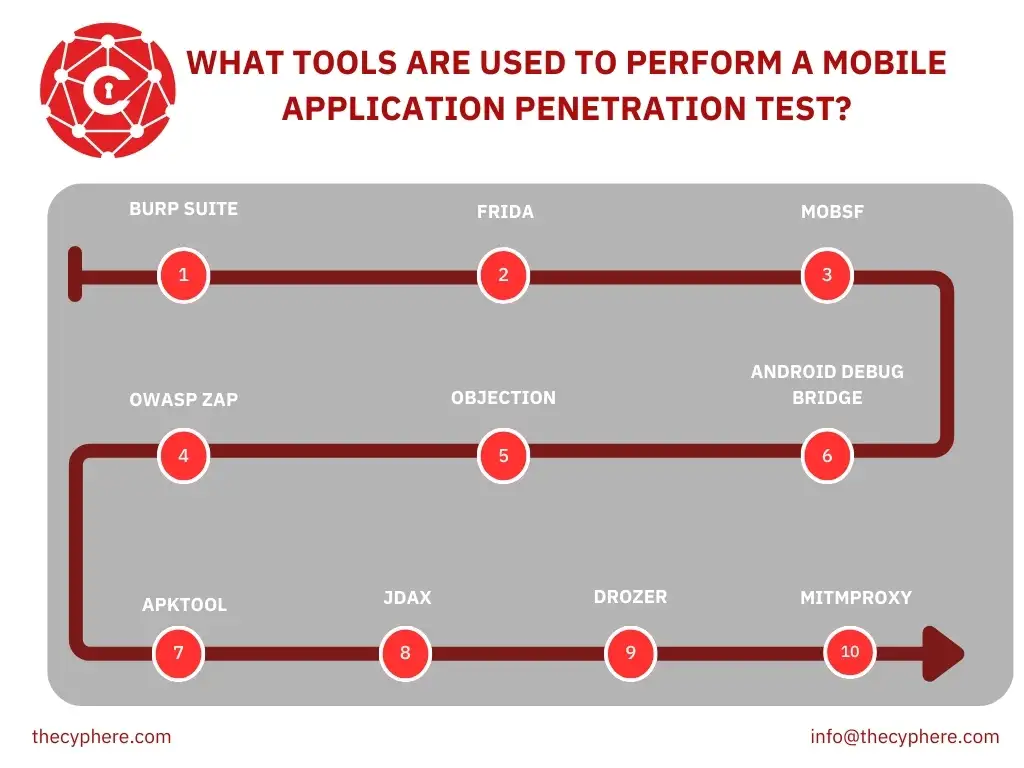
The tools used to perform mobile application penetration testing are listed below.
- Burp Suite: Burp Suite is an interception and testing tool which serves as a proxy to intercept and modify mobile app or API HTTP(S) traffic. It is applied to route the packet traffic via Burp to analyse the requests, replay requests and manipulate parameters. It assists in evaluating the problem areas, such as broken authentication, improper handling of sessions, poor input validation, API vulnerability, and improper TLS configurations. Burp Suite excels at advanced request manipulation, automated scanning and offers an extensive extension capability.
- Frida: Frida is a dynamic instrumentation toolkit that injects custom scripts into running mobile applications to monitor internal behaviour and modify logic in real-time. It is applied through attaching itself to the running processes of the operating system and hooking functions, tracing variables, evading security checks or manipulating logic. It reveals weaknesses like poor cryptography, weak runtime choices, hard-coded secrets and circumventable client-side defences. Frida provides hooking live functions, script automation, and the possibility of modifying the behaviour of the apps without recompiling the APK.
- MobSF (Mobile Security Framework): MobSF is a mobile penetration testing tool that automates the checks of Android and iOS applications as a static, dynamic, and malware analysis tool. It is used to upload an APK/IPA to do a static analysis or start the app in the dynamic environment of MobSF to trace real-time functionality. It identifies insecure storage, unprotected components, hard-coded keys, weak network setups, old libraries, and certificate verifications. MobSF provides automated reporting, malware ranking, an integrated MITM environment, and hybrid analysis, as stated by Jingyun Zhu et al, in the title “A Comprehensive Study on Static Application Security Testing (SAST) Tools for Android”, published in 2024.
- OWASP ZAP: OWASP ZAP is a mobile application interception and testing proxy that is open-source and used to identify security-related problems. It is applied to proxy routes and performs traffic analysis of endpoints with the help of spiders, scanners, and fuzzers. It detects SQL injection, XSS, insecure cookies, insecure headers, and session weaknesses. ZAP features a powerful API for automation and passive scanning modes, making it an accessible and effective alternative for budget-conscious testers.
- Objection: Objection is a runtime mobile exploration toolkit powered by Frida. It enables security testers to assess mobile apps on rooted/jailbroken devices without needing to write custom Frida scripts. It is widely used to bypass SSL Pinning, disable root detection, inspect local storage, and dump memory. Objection excels at finding insecure local data, bypassed security controls, and plaintext sensitive data in memory.
- Android Debug Bridge (ADB): ADB communicates with Android devices in a command-line environment to debug the system, read and write files, and analyse the system. ADB is utilised by testers to pull mobile application files, inspect logs, trigger components, access restricted directories and invoke device-level commands. Android Debug Bridge provides deep control of the device and built-in shell access.
- Apktool: Apktool is a reverse engineering tool used to decode Android application resources (like AndroidManifest.xml and layout files) and disassemble code into Smali. It is crucial for analysing permissions, misconfigured components, and app behaviour. Testers use Apktool to modify the app’s internals (e.g., to insert debug flags) and rebuild the APK for further testing.
- JADX: JADX is a decompiler which transforms Android bytecode to understandable Java code that can be analysed easily. It is used to test mobile application logic, locate hard-coded credentials, scan API endpoints, and high-level code flow. It assists in detecting insecure cryptography, obfuscated URLs, vulnerabilities in authentication and sensitive data placed in the code. JADX provides clean Java output, quick decompiling, and easy navigation for reviewing a complex application.
- Drozer: Drozer is an Android testing framework that is used to evaluate inter-process communication and component exposure in mobile apps. It is applied by sending designed interactions to the activities, content providers, and broadcast receivers to uncover its weaknesses. It also exposes insecure IPC, SQL injection in the content providers, privilege escalation and unintended component access. Drozer has intensive involvement with the component architecture of Android and inbuilt modules that replicate actual attack situations.
- Mitmproxy: Mitmproxy is a lightweight, interactive intercepting proxy for HTTP/S traffic. It is often used for its scriptable Python interface, allowing testers to automate attacks or modify traffic flows programmatically. It is excellent for analysing insecure API calls, poor TLS validation, and parameter manipulation, offering a flexible alternative to heavier GUI proxies.
Can you automate mobile application penetration testing?
Yes, mobile application penetration testing can be automated by specialised tools like Burp Suite, OWASP ZAP and Frida. The principle of these automated solutions is to scan all the code of the application, both in static analysis and dynamic analysis, to identify common vulnerabilities, misconfigurations, and compliance problems without having to input each test case separately. Both automated and manual mobile penetration testing are best according to the situation and vulnerability. Automation is effective in detecting regular problems and in a faster testing procedure. The manual mobile penetration testing is used to identify any complex and logical flaws that cannot be noted by any other means than human intuition, as described by Amin et al, in the title “AndroShield: Automated Android Applications Vulnerability Detection, a Hybrid Static and Dynamic Analysis Approach”, published in 2019.
What kind of vulnerabilities are found in mobile penetration testing?
Mobile penetration testing vulnerabilities are flaws and vulnerabilities that are specific to the mobile environment, like data security, flawed communications and misconfigurations.
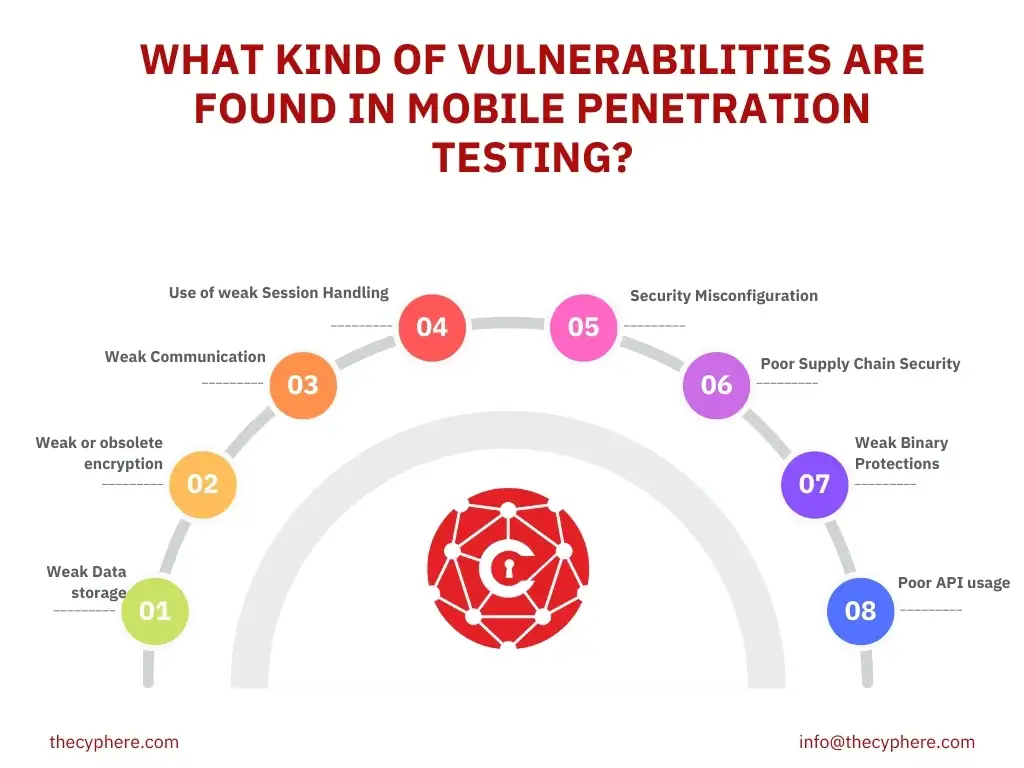
The vulnerabilities found in mobile application penetration testing are listed below.
Weak Data storage
Weak or obsolete encryption
Weak Communication
Use of weak Session Handling
Security Misconfiguration
Poor Supply Chain Security
Weak Binary Protections
Poor API usage
What is Cyphere’s experience with mobile penetration testing?
Cyphere offers risk identification, service quality, and solution of mobile app vulnerabilities. Cypher involves the identification of risks, followed by risk remedial planning support to your teams. Cyphere does not consider mobile pen testing as a one-time task, but it is part of your risk management strategy that is never-ending. Cyphere has experience with both iOS and Android applications. Cyphere methodology includes checks around OWASP mobile top 10 risks and apply an extensive approach to the OWASP MASVS to ensure completeness. Cyphere is not only evaluating at a technical level, but we are also doing a complete security deep-dive in these key areas.
In mobile penetration testing services, Cyphere finds risk models, providing professional insights for effective risk treatment. Cyphere has strict protocols for handling all data and findings. Cyphere covers all retests and cancellations in a period of twelve months with Continuous Pen Testing.
What are the best practices to follow while doing mobile penetration testing?
The best mobile penetration testing practices are listed below.
- Define a clear scope and proper planning: Defining a clear scope in mobile penetration testing avoids unintentional access to protected systems, making the evaluation legally safe. Effective planning in mobile penetration testing is necessary for the best results and to avoid any mishaps like data loss or legal issues.
- Test data storage and transmission: Testing the data storage and transmission in mobile penetration testing finds actual vulnerabilities in mobile apps, such as unsafe storage and unencrypted databases. Testing data storage prevents unauthorised access and builds mobile app user trust.
- Do authentication reverse engineering: Authentication and reverse engineering in mobile penetration testing show vulnerabilities in the system of log-ins, session management, and API keys in mobile apps. Reverse engineering in mobile app penetration testing is essential for internal application logic that cannot be identified by black box testing.
- Prepare documentation: and provide a solution: Prepare documentation of mobile penetration testing, including each vulnerability, its manner of discovery, the ways it happens, and the effects on the mobile application. Documentation is necessary to keep a record and find the best remedies against vulnerabilities. Providing the answers to all mobile app vulnerabilities by using static analysis, dynamic testing, and code reverse engineering is necessary to secure the app before the attacker exploits it.
How to find a reliable mobile app pentester?
To find the best mobile application pentester, go beyond the mere certifications and judge them with solid contextual experience. A skilled pentester is highly interested in how your app works, not just a technical head who wants to find bugs that could or could not represent a risk to the business. Always focus on their abilities and skills rather than their ability to use tools to run data. The mobile app pentester must appreciate the reality of the situation, that a simple-looking app is not simple. The mobile app pentester should know how to handle mobile applications, their APIs, and information stored on the phone. A false sense of security happens when an unskilled tester does not test every component. The mobile app pentesters are required to show experience by emphasising: Logic Flaws, Adversary Insight, understanding how threat actors attack your vertical, and Accreditations, showing their knowledge of their subject domain.
What are the benefits of mobile penetration testing for a business?
The top benefits of mobile penetration testing are listed below.
- Identifies active vulnerabilities: Mobile penetration testing identifies and mitigates active mobile app vulnerabilities to minimise the possibility of data breaches in businesses and cyberattacks in mobile apps. The data breach in business resulted in financial loss, reputational damage, and loss of intellectual property.
- Secures Sensitive Data: Mobile penetration testing secures personal, financial and corporate information on mobile devices of an organisation. Securing sensitive data in business mobile apps reduces the risk of leaking sensitive information and confidential business plans, as stated by Shari-Ann Smith-Haynes in the title “Advanced Penetration Testing for Enhancing 5G Security”, published in 2024.
- Enhances User Trust and Reputation: Mobile penetration testing reveals security concerns, secure data and secret information, which increases user trust and the reputation of the business. A secure app is a key factor in storing confidential business data.
- Regulates Compliance: Penetration testing is often a mandatory requirement for adhering to industry standards such as GDPR, PCI DSS, and HIPAA. Regular assessments provide the evidence needed for auditors, ensuring the business avoids heavy fines and legal penalties associated with non-compliance.
- Prepares report: Mobile penetration testing provides detailed and actionable reports that inform security strategies and remediation actions. Reporting helps in finding the best way to mitigate the mobile vulnerability and avoid it in future to save the business data from loss before the attacker exploits it.
- Optimises cost and resources: While penetration testing requires an upfront investment, it is significantly cheaper than the cost of a data breach. Furthermore, identifying vulnerabilities early in the Software Development Life Cycle (SDLC) is far less expensive than patching an application after it has been released to the public.
- Secures development Lifecycle: Mobile penetration testing, integrating security testing into the software development process, and guiding developers in creating more secure mobile applications to protect sensitive business data.
How much does it cost to perform mobile penetration testing?
The cost of Mobile penetration testing ranges from £3,500 to £30,000+. A single mobile app penetration test costs £3,500–£6,000. Manual mobile penetration testing and API backend costs £6,000 to £25,000 because it’s a time-consuming process. The cost of mobile app penetration testing increases while handling more sensitive data and using the latest technology (£18,000–£30,000+).
The cost of the mobile penetration testing depends on Platform and Device Diversity, Manual and Automated Testing, Testing Scope and Depth, the absence of Standardised Tools, Scalability, On-Demand Services and the Combination of Multiple Testing Methods, as stated by Garvit Chandna, titled “The Role of Automation in IoT Testing: Enhancing Efficiency and Coverage” published in 2025.
How much time does it take to perform mobile penetration testing?
The duration of mobile penetration testing ranges from 2 to 3 weeks. The duration of mobile penetration testing for a simple app is 5-7 business days. Manual mobile app penetration testing takes 5-15 business days. The duration of mobile app penetration testing for an integrated system is 2-3 weeks due to its complexity, API settings and white box or black box information.
The duration of mobile penetration testing is based on the complexity of the engagement and the complexity of the apps under test. The duration of mobile penetration testing depends on App Complexity and Scope, Diversity of Platform and Devices, Manual vs. Automated Testing, Security Features and Encryption and Testing Model and Methodology.