Wireless penetration testing evaluates Wi-Fi networks through controlled attacks that identify weaknesses in encryption, authentication, and radio-frequency exposure. Wireless penetration testing measures the strength of wireless defences against credential harvesting, rogue access point activity, and lateral movement attempts.
According to a 2025 observational study by Gao et al., titled “A Nationwide Census on Wi-Fi Security Threats: Prevalence, Riskiness, and the Economics,” 3.92% of 19 million surveyed Wi-Fi access points showed active attack signatures, including Evil Twin and injection attempts.
WPA2 handshake-capture attacks succeeded on over 75% of weak passphrase networks, a high-risk outcome, according to a 2025 experimental study by Park et al., titled “Evaluating the Practical Feasibility of WPA2 Credential Harvesting,” which included 4,500 simulated attack sessions. Wireless intrusion systems are able to block about 90% of low-noise Wi-Fi scanning attempts after configuration tuning, according to a 2025 engineering report by Singh et al., titled “Adaptive Defense Behavior in Enterprise Wireless Intrusion Prevention Systems.”
The cost to perform wireless penetration testing ranges from £3,000 to £20,000+.
The main process for performing wireless penetration testing includes configuring wireless adapters, conducting wardriving, fingerprinting, decrypting encryption, scanning for protocol weaknesses, exploiting confirmed wireless flaws, and assigning risk levels. The tools used for wireless penetration testing include Kismet, Wireshark, Aircrack-ng, Reaver, PixieWPS, Airgeddon, and Airsnor. The frameworks used for wireless penetration testing include Sniffair, WiFi-Pumpkin, Eaphammer, Fluxion, and the Evil Twin Framework.
What is Wireless Penetration Testing?
Wireless penetration testing evaluates Wi-Fi networks through authorised attack techniques that expose weaknesses in encryption, authentication, and radio-frequency behaviour. Wireless attack simulation gained wider adoption across corporate assessments, with reports of growing interest in credential-harvesting scenarios and rogue access-point testing in large organisations.
Other names for wireless penetration testing include Wi-Fi security testing, WLAN security evaluation, wireless ethical hacking, Wi-Fi security assessment, wireless auditing, wireless penetration testing, and wireless vulnerability assessment.
Wireless penetration testing involves identifying broadcast SSIDs, examining access-point configurations, capturing handshakes, reviewing WPS behaviour, checking client isolation, analysing frame activity, and assessing how wireless boundaries respond to hostile radio activity. Wireless penetration testing features radio-frequency mapping, handshake interception, Evil Twin construction, weak encryption (WEP/WPA), rogue access points, hidden SSIDs, signal bleed, guest network isolation, authentication bypass (EAP/PSK), client-side flaws, and client-side manipulation techniques.
How does wireless penetration testing work?
Wireless penetration testing judges how a Wi-Fi network reacts to controlled attacks that uncover weaknesses in encryption and authentication. Testers observe broadcast SSIDs, access-point settings, and frame behaviour to understand how devices respond to hostile activity. The process includes handshake capture, Evil Twin simulation, and targeted probing that exposes paths an attacker could exploit.
Wireless penetration testing identifies weak passwords, unsafe encryption, misconfigured access points, rogue devices, WPS issues, and unpatched clients. It reveals conditions that allow traffic interception, unauthorised access, or internal pivoting. It highlights gaps that routine configuration checks often miss.
Wireless penetration testing helps organisations fix issues before attackers find them. It reduces breach risk, supports compliance, validates wireless controls, and improves response readiness. It strengthens overall wireless posture and protects sensitive information.
Wireless penetration testing focuses on finding and correcting wireless security flaws through realistic attack behaviour. It checks encryption strength, authentication flow, segmentation, access controls, and exposure to rogue devices. It ensures the wireless network protects data, blocks unauthorised entry, and maintains reliable operations.
How to perform wireless penetration testing?
Listed below are the 10 steps used to perform wireless penetration testing.

1. Configure the wireless adapter to monitor mode.
Configuring the wireless adapter to monitor mode allows the wireless security analyst to capture unauthenticated 802.11 (Wi-Fi technical standard) frames directly from the air without joining a network. This stage prepares the testing workstation to observe beacons, probe requests, association attempts, and channel activity under controlled radio conditions. According to a 2025 wireless security study by Harrington et al., titled “Frame Capture Reliability in Modern 802.11 Security Assessments”, stable monitor-mode collection requires chipset compatibility, controlled channel locking, and calibrated driver behaviour to prevent significant 802.11 frame loss during analysis.
The assessment team places the adapter in monitor mode by loading supported drivers, releasing network-manager control, selecting a target channel, and confirming frame visibility through test captures. This step produces artefacts such as raw frame logs, beacon inventories, and channel-usage snapshots that feed into access-point enumeration and later handshake collection. These outputs help the testing lead verify radio conditions and confirm that the wireless layer exposes enough signalling activity to support the subsequent phases of testing.
Monitor mode reveals management and control traffic that normally remains hidden from standard interfaces. It exposes broadcast activity, hidden SSID behaviour, and channel occupancy patterns that guide the next enumeration and handshake-capture steps. Standard tools used in this step include airmon-ng, iw, hcxdumptool, and chipset-specific utilities that enable monitor-mode operation on supported wireless adapters.
2. Conduct reconnaissance and site survey through wireless wardriving.
Conducting reconnaissance through wireless wardriving allows the wireless assessment team to map broadcast activity across the target environment. The wireless security analyst, RF technician, and assessment lead record beacon frames, signal strength, channel allocation, and access-point placement while moving through defined survey paths.
According to a 2025 study by Mitchell et al., titled “Operational Mapping of Wi-Fi Exposure Zones in Security Assessments”, structured wardriving captures spatial variations in signal behaviour that reveal insecure broadcasts and overlooked access-point deployments.
The survey team performs wardriving by using a calibrated wireless adapter, GPS receiver, and signal-logging workstation to record broadcast traces across indoor and outdoor paths. This phase produces artefacts such as RF heat maps, access-point inventories, GPS-tagged beacon logs, and channel-usage summaries that support later enumeration and risk classification. These outputs help the assessment lead identify unauthorised access points, overlapping coverage zones, and broadcast conditions that differ from documented network architecture.
Wardriving reveals signal leakage, misaligned antennas, unmanaged access points, and hidden networks that routine administrative reviews fail to locate. It exposes coverage areas that extend beyond building boundaries and identifies regions where unsafe encryption or default configurations appear. Standard survey tooling for this phase includes Kismet, GPS logging modules, and capture utilities that record broadcast activity along defined wardriving routes.
3. Identify and enumerate access points, clients, and SSIDs
Identifying and enumerating access points allows the wireless security analyst to create an accurate inventory of broadcast networks, associated clients, and hidden SSIDs within the assessment boundary. This phase records beacon information, probe responses, authentication attempts, and device identifiers under consistent channel-monitoring conditions. According to a 2025 wireless analysis study by Reynolds et al., titled “Enumeration Reliability in High-Density Wi-Fi Assessments”, controlled multi-channel scanning improves the accuracy of client and SSID detection in environments that contain overlapping or misconfigured access points.
The assessment team performs enumeration by reviewing captured beacons, analysing supported rates, checking channel patterns, and correlating client requests with access-point footprints. This step produces artefacts such as SSID lists, BSSID inventories, client-association traces, and network-visibility snapshots that support encryption analysis and later handshake collection. These outputs help the testing lead detect undocumented access points, guest-network broadcasts, and client behaviour that diverges from expected wireless architecture.
Enumeration reveals broadcast networks that administrators may have overlooked. It highlights client devices interacting with unsafe or unauthorised access points and exposes SSID broadcasts that disclose internal naming conventions. Standard enumeration tooling in this stage includes Kismet, airodump-ng, and other capture utilities that present structured access-point and client inventories during wireless assessments.
4. Fingerprint and analyse encryption protocols and configurations
Fingerprinting and analysing encryption protocols gives the assessment team a precise view of the protections applied to each broadcast network. The wireless analyst reviews captured frames to check networks rely on WPA2, WPA3, transitional modes, or legacy mechanisms. According to a 2025 study by Lambert et al., titled “Security Posture of Enterprise Wi-Fi Deployments in Transitional Encryption Modes”, environments that retain mixed WPA2/WPA3 settings expose devices to predictable weaknesses due to inconsistent negotiation sequences.
The assessment team examines key management behaviour, authentication exchanges, and frame-protection indicators recorded during monitoring and enumeration. These details produce artefacts such as encryption-mode summaries, authentication-flow traces, and configuration maps. The outputs assist the assessment lead in identifying transitional compatibility settings and authentication paths.
Encryption analysis exposes gaps in deployment consistency and highlights configurations that disclose more information than administrators intend. It shows networks operating with obsolete settings or mixed-mode transitions that create unnecessary exposure during client association. Standard analysis tooling in this phase includes Wireshark, airodump-ng, and the wireless-capture suite.
5. Scan for vulnerabilities and research exploits.
Scanning for vulnerabilities gives the assessment team an early indication of weak points across the wireless surface. The analyst reviews packet captures, access-point behaviour, and client responses to identify outdated firmware, unsafe encryption settings, broken isolation features, and exposed management services that appear during wireless activity. According to a 2025 assessment study by Collins et al., titled “Observed Failure Patterns in Wireless Misconfiguration Testing,” overlooked access-point services and incomplete patching cycles remain among the most common causes of wireless exposure in enterprise environments.
The testing lead examines the material gathered during earlier phases and checks it against known issues, recent advisories, and confirmed exploit paths affecting WPA2, WPA3, WPS, and device-specific implementations. This stage produces a working list of broadcast networks, associated risks, relevant advisories, and exploit conditions that require deeper investigation in later phases.
Vulnerability scanning brings forward issues that administrators do not detect during routine updates. It exposes weak service banners, open diagnostic functions, and inconsistent behaviour across access-point clusters. Wireless scanners, packet-inspection tools, and advisory-mapping utilities support this phase by presenting identifiable weaknesses and linking them to known exploit material.
6. Execute deauthentication attacks on clients.
Deauthentication testing gives the wireless assessment team a view of client behaviour when broadcast integrity is disrupted. The wireless analyst triggers controlled deauthentication frames to observe how nearby devices react to unexpected disconnection events during association and roaming activity.
The assessment leads studies the responses recorded in earlier captures and notes which clients reconnect immediately, which shift channels, and which reveal additional details in new probe requests. The material gathered here forms a short set of artefacts: reconnection traces, probe-request changes, and indicators that help shape later credential-capture work. These observations guide the team’s next steps and show which devices reveal more information when exposed to controlled disruption.
The test reveals client devices that reconnect without proper safeguards, expose extra identifiers after restart events, or contact unauthorised access points during the reconnection process. The tools used for this phase include Aireplay-ng and other frame-injection utilities used to send controlled deauthentication frames during wireless testing.
7. Capture WPA/WPA2 four-way handshakes.
Capturing the four-way handshake gives the assessment team a record of the authentic exchange that occurs when a client reconnects to an access point. The wireless analyst monitors the moment a device attempts to establish fresh encryption material and records the frames that form the handshake sequence.
The testing lead reviews the captured material and separates valid handshakes from partial or noise-affected sequences to build a workable set for later credential analysis. These captures become artefacts for downstream review, including PMKID samples, replay records, and association traces that support dictionary-based recovery work. The material also helps the assessment team identify clients who reveal more negotiation details than expected during reconnect attempts.
Handshake activity exposes devices that reuse predictable timing, reveal additional identifiers during renewed association, or present compatibility gaps between firmware generations. The analyst uses airodump-ng or hcxdumptool to capture the frames a client exchanges during a fresh association.
8. Harvest and crack credentials through offline dictionary attacks
The assessment team harvests the material collected during earlier phases and prepares it for offline review. The analyst extracts valid handshake samples, PMKID records, and replay material from the capture set and places them into a controlled workspace.
The analyst reviews each handshake, removes incomplete sequences, and builds a final list of usable records for recovery attempts. This stage produces hash samples, PMKID entries, and metadata that guide the attack dictionary and reveal the strength of the organisation’s password construction practices. These outputs show where weak passphrases, legacy naming patterns, and predictable word combinations reduce the expected protection of WPA-based deployments.
Offline recovery work highlights access points and clients that rely on short passphrases, small variation patterns, or naming conventions that attackers can guess with limited effort. It also marks networks that fail to rotate shared keys or rely on credentials that remain unchanged for long periods. The analyst uses cracking suites such as hashcat, John-based tooling, or similar recovery utilities.
9. Execute exploitation attacks on identified vulnerabilities.
The assessment team uses the confirmed weaknesses from earlier phases to test the impact of each finding under controlled conditions. The analyst targets access points or clients that show unsafe services, weak isolation rules, or outdated firmware and checks the level of access gained during each attempt.
The analyst reviews the behaviour of the affected device, notes any privilege gained during the interaction, and records new traffic or signalling that appears during the attempt. These actions produce material such as exploit traces, session notes, privilege indicators, and broadcast changes that support later risk classification. The outputs help the assessment lead confirm which weaknesses permit meaningful access and which require administrative correction.
Exploitation testing exposes gaps that routine configuration reviews often miss, such as forgotten management interfaces, faulty access-point modules, or services that remain active after partial updates. The team uses wireless exploitation frameworks and targeted attack scripts during this phase to test the effect of each confirmed weakness under controlled assessment conditions.
10. Document findings with risk classifications
The assessment team gathers the material produced in earlier phases and records each weakness with clear evidence, affected broadcast segments, and the conditions that triggered the behaviour. The analyst writes each entry with frame samples, timestamps, client behaviour, and configuration notes that reflect what actually occurred during the assessment. This record forms the basis of the report review conducted by the assessment lead and the organisation’s security contact.
The testing lead assigns a risk level to every confirmed issue using the organisation’s scoring method. These entries describe the weakness, the conditions that allowed it to appear, and the impact observed during controlled testing. The collected artefacts include exploit traces, handshake records, misconfiguration notes, and access-point behaviour logs that support later mitigation planning. This material helps administrators correct configuration drift, update firmware, and retire unsafe broadcast settings.
Report preparation highlights areas that require attention, such as weak passphrases, unmanaged access points, unsafe broadcast behaviour, or client devices that reveal additional information during reconnect events. The security analyst prepares the final report in Dradis or Faraday and attaches evidence collected during the wireless assessment.
Manual wireless penetration testing uncovers broadcast behaviour, client reactions, and configuration issues that automated tools usually miss. Automated testing handles broad scanning and repetitive wireless checks at speed, especially when routine capture tasks or wide coverage are required. A combined approach remains strongest because automated tools provide reach while human testers identify context-driven weaknesses that appear only in real environments.
How much does it cost to perform wireless penetration testing?
The cost to perform wireless penetration testing ranges from £3,000 to £20,000+. The hourly rate for wireless penetration testing in the UK ranges from £80 to £300+, based on senior tester day rates. The daily price for wireless testing ranges from £800 to £2,500 per tester-day, while rates below £800 per day often indicate scan-only work rather than full analysis.
The weekly cost for a standard wireless assessment ranges from £3,000 to £15,000 per tester, based on a 5-day engagement. The quarterly cost for an organisation that performs one wireless test each quarter ranges from £12,000 to £60,000 per year at mid-market rates. The yearly cost for a mid-sized business that commissions one substantial wireless assessment ranges from £6,000 to £30,000, while larger estates with multiple sites and dense access-point deployments exceed £50,000 to £120,000+ per year. Wireless penetration testing costs change with the number of access points, the size of the assessment area, and the mix of hardware present in the broadcast environment.
How much time does it take to perform wireless penetration testing?
Wireless penetration testing takes 2 days to several weeks. Small wireless assessments usually finish in 2 to 3 days. Medium environments with multiple SSIDs or IoT devices require 5 to 10 days. Large or complex estates often need 10 or more days, especially during multi-site testing. Wireless testing duration changes with the number of access points, the broadcast layout, and the presence of guest or IoT networks.
What checklist should you follow for wireless network penetration testing?
A wireless network penetration testing checklist is a structured guide that lists the actions required to assess wireless security. It sets the items that the assessment team must review before, during, and after the test.
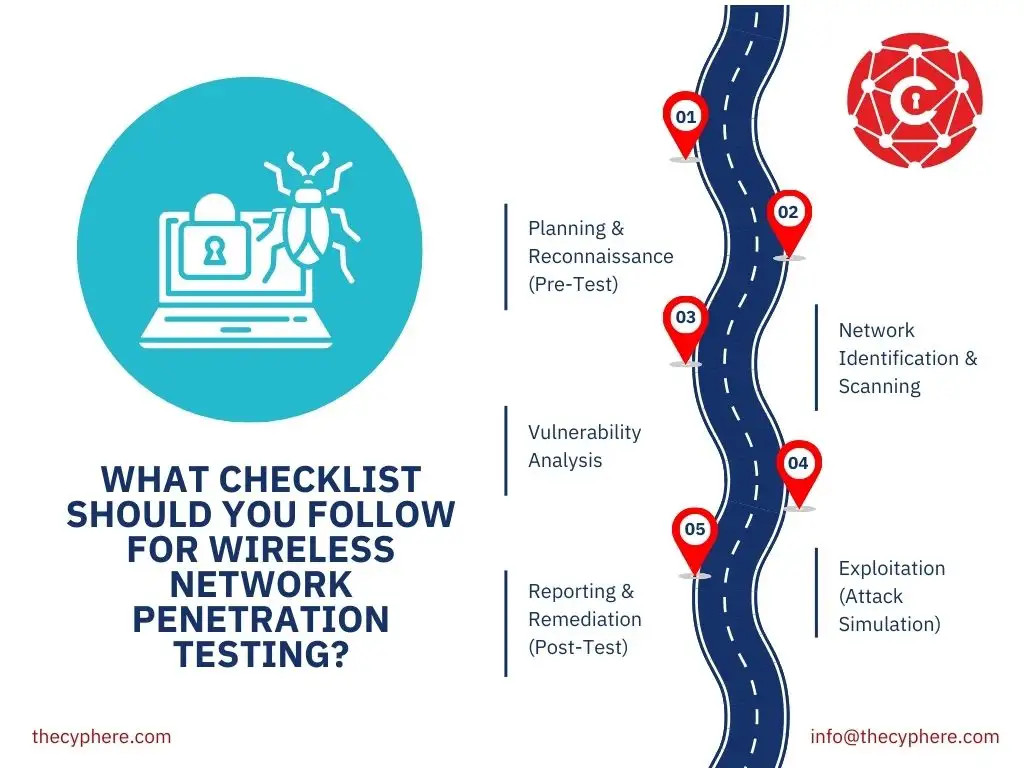
Listed below is the checklist for wireless network penetration testing.
Planning & Reconnaissance (Pre-Test)
Network Identification & Scanning
Vulnerability Analysis
Exploitation (Attack Simulation)
Reporting & Remediation (Post-Test)
What are wireless penetration testing standards?
Wireless penetration testing standards are structured framework methodologies used to assess Wi-Fi security, weak encryption, unsafe broadcasts, and segmentation errors under controlled testing. The main wireless testing standards include PTES, OSSTMM, and the IEEE 802.11 security rules used to review wireless behaviour and encryption strength.
PTES sets the testing flow for reconnaissance, scanning, controlled attacks, and report preparation during wireless assessments. OSSTMM provides the measurement model used to review exposure, device behaviour, and protocol safety in wireless environments. IEEE 802.11 security rules, which include WPA2 and WPA3 controls, describe the technical requirements checked during encryption and configuration review.
What tools are used to perform wireless penetration testing?
Wireless penetration testing tools are specialised utilities that capture wireless traffic, observe access-point behaviour, and analyse device authentication during testing.
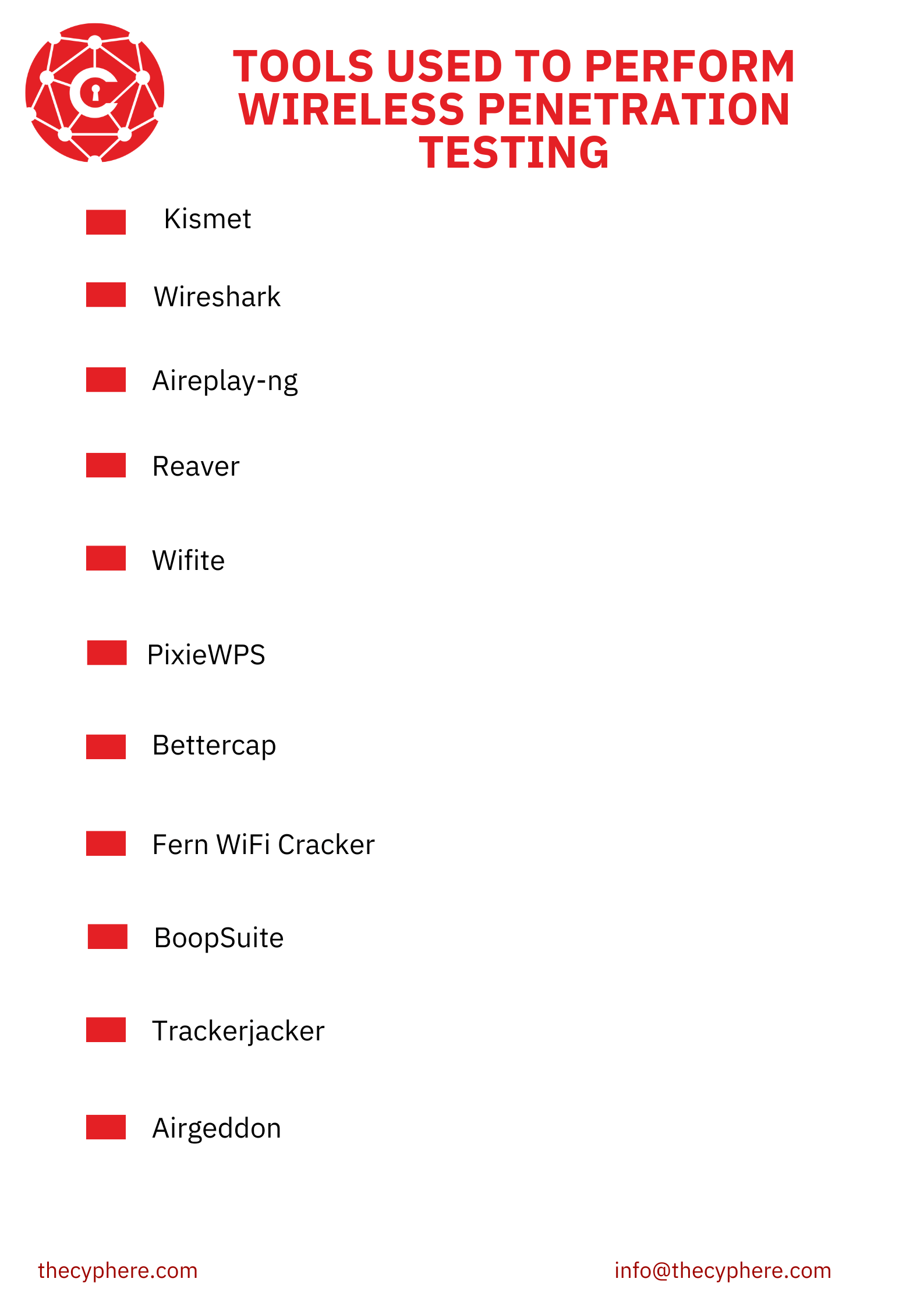
Listed below are the tools used to perform wireless penetration testing.
- Kismet: Kismet is a wireless-monitoring tool that identifies access points, client devices, and hidden networks during reconnaissance. The tool runs on Linux, performs passive 802.11 capture, and supports multiple wireless chipsets without sending active frames. It focuses on hidden SSIDs, unauthorised access points, unusual channel use, and unregistered devices appearing in the environment. It is used in the reconnaissance phase to map wireless activity before targeted capture begins. Kismet reveals risks involving rogue access points, unsafe SSID configurations, and unapproved wireless infrastructure.
- Wireshark: Wireshark is a packet-analysis tool used to inspect 802.11 wireless frames and assess protocol behaviour during wireless testing. This is an open-source, free tool and runs on Windows, Linux, and macOS. It targets malformed frames, negotiation sequences, handshake anomalies, and protocol inconsistencies. Wireshark is used in the analysis phase after capture to interpret wireless traffic at the frame level. It helps to detect faulty encryption negotiation, exposed metadata, protocol errors, and unsafe broadcast behaviour.
- Aireplay-ng: Aireplay-ng is an injection tool used in wireless penetration testing to trigger client actions and force authentication events for controlled analysis. Aireplay-ng runs on Linux, supports multiple chipsets, sends crafted 802.11 frames, and performs deauthentication or replay sequences that help generate fresh handshake material. Aireplay-ng targets client isolation gaps, authentication handling, broadcast reactions, and roaming behaviour (devices reconnecting without validation).
- Reaver: Reaver is a WPS-attack tool used in wireless penetration testing to assess the strength of PIN-based access-point authentication. Reaver runs on Linux, interacts directly with WPS exchange packets, and performs controlled PIN attempts through chipset-supported drivers. The program targets insecure WPS behaviour and devices that fail to enforce lockouts (older home router models).
- Wifite: Wifite is an automation tool used in wireless penetration testing to streamline handshake capture, client interaction, and attack sequencing for multiple targets. The tool runs on Linux, chains together scanning, deauthentication, and capture steps, and supports several chipsets used in packet injection. Wifite targets weak passphrases, exposed handshakes, poor isolation behaviour, and unstable association flows (for example, clients reconnecting without validation). Wifite is used in the reconnaissance and attack phases to gather authentication material and trigger controlled interactions.
- PixieWPS: PixieWPS is an offline WPS-attack program used in wireless penetration testing to evaluate weak PIN-generation methods in access points. The tool runs on Linux, processes captured WPS exchange data, and attempts rapid PIN derivation through algorithm weakness rather than continuous online retries. The program targets predictable PIN logic, exposed nonces, and incomplete WPS implementations (devices with static seed values).
- Bettercap: Bettercap is a wireless assessment toolkit used in wireless penetration testing to inspect broadcast activity, conduct Evil Twin setups, and trigger controlled client interactions. Bettercap runs on Linux and macOS, supports frame injection, monitors 802.11 management traffic, and is widely used for broadcast manipulation during security reviews. The toolkit targets rogue access-point behaviour, misassociation events, weak client validation, and open broadcast channels (unauthenticated probe responses). Industry wireless surveys in 2025 reported that nearly 34% of Wi-Fi incidents involved client connections to unverified access points. It is used in reconnaissance and exploitation phases when analysts need to test user trust paths and evaluate broadcast-layer exposure.
- Fern WiFi Cracker: Fern WiFi Cracker is a wireless auditing toolkit used in wireless penetration testing to test WPA/WPA2 keys, inspect WPS behaviour, and review basic wireless configurations. Fern runs on Linux, provides a graphical interface, supports multiple wireless chipsets, and testers use it for rapid key-testing workflows when reviewing smaller environments. The toolkit targets weak passphrases, exposed WEP networks, poor encryption settings, and unprotected WPS modes (PIN entry left active). Fern reveals vulnerabilities involving weak passwords, outdated encryption choices, and permissive WPS settings (routers accepting repeated PIN attempts).
- BoopSuite: BoopSuite is a lightweight wireless monitoring utility used in wireless penetration testing to detect nearby access points and observe basic 802.11 activity for reconnaissance. BoopSuite runs on Linux, uses Python-based modules, supports multiple wireless chipsets, and testers use it for quick signal scans during preliminary reviews. The utility targets broadcast activity, channel congestion, weak SSID configurations, and unmanaged access points (temporary hotspots created by staff). According to the 2025 wireless survey, 18% of incident reports involved ad-hoc hotspots that testers only detected through lightweight scanning tools.
- Trackerjacker: Trackerjacker is a wireless mapping utility used in wireless penetration testing to track device movement, signal patterns, and access-point association behaviour across monitored areas. Trackerjacker operates on Linux, uses passive monitoring, supports GPS integration, and testers use it for movement-based reconnaissance during physical-wireless assessments. The utility targets roaming behaviour, unstable associations, unusual probe requests, and unauthorised device activity (personal hotspots moving between floors). Trackerjacker reveals risks involving rogue device movement, unsafe roaming policies, and unapproved hotspots (mobile devices acting as APs during work hours).
- Airgeddon: Airgeddon is a multi-mode toolkit used in wireless penetration testing to run Evil Twin attacks, capture handshakes, and test WPS behaviour across 802.11 networks. Airgeddon runs on Linux, combines several wireless utilities, supports multiple chipsets for injection, and testers use it when they need guided workflows for broadcast manipulation. The toolkit targets misassociation patterns, weak client validation, SSID spoofing scenarios, and unsafe WPS modes (push-button settings left active. Airgeddon reveals vulnerabilities that include misassociation risk, weak client resistance, unsafe SSID configurations, and inconsistent authentication handling (clients joining portals without validation).
What frameworks are used to perform wireless penetration testing?
Wireless penetration testing frameworks are structured toolsets used to run coordinated wireless attacks, capture traffic, and test how access points and client devices react to controlled broadcast activity.
Listed below are the frameworks used for wireless penetration testing.
- SniffAir: SniffAir is a wireless reconnaissance framework used in wireless penetration testing to collect and organise broadcast activity across access points and client devices. It maps SSIDs, tracks beacon patterns, gathers signal data, and builds structured profiles for wireless environments. SniffAir highlights exposure involving unmanaged access points, unsafe broadcast settings, and roaming behaviour.
- WiFi-Pumpkin: WiFi-Pumpkin is a rogue access-point framework used in wireless penetration testing to create Evil Twin setups, captive portals, and credential-harvesting scenarios. It supports multiple attack modules, DNS manipulation, phishing portals, and controlled client redirection during broadcast manipulation. WiFi-Pumpkin exposes risks involving misassociation, unsafe SSID trust, credential leakage, and insecure user authentication paths in wireless networks.
- Eaphammer: Eaphammer is an attack framework used in wireless penetration testing to target enterprise authentication protocols, including WPA-Enterprise and 802.1X. It generates controlled Evil Twin setups, manipulates EAP traffic, and captures enterprise authentication attempts during broadcast impersonation. Eaphammer reveals vulnerabilities involving weak certificate validation, misconfigured EAP settings, and unsafe client trust paths that allow attackers to impersonate authorised networks.
- WiFi Exploitation Framework: WiFi Exploitation Framework is a modular platform used in wireless penetration testing to run coordinated attacks against access points and associated clients. It combines scanning, deauthentication, handshake capture, credential attacks, and AP manipulation modules in one workflow. This framework uncovers vulnerabilities involving exposed handshakes, weak passphrases, WPS weaknesses, and poor SSID configuration controls.
- RogueSploit: RogueSploit is a wireless exploitation framework used to simulate rogue access-point behaviour and test how clients react to spoofed wireless identities. It replicates broadcast signatures, clones SSIDs, and performs targeted association manipulation for trust-path testing. RogueSploit exposes weaknesses involving misassociation, client-side validation gaps, and environments where devices join unauthorised wireless sources.
- Wacker: Wacker is a Wi-Fi attack framework used in wireless penetration testing to craft controlled authentication attacks and replay wireless exchanges. It automates frame crafting, manages replay sequences, and supports multiple chipsets for active testing. Wacker highlights vulnerabilities involving weak authentication handling, unstable session control, and replay exposure in poorly configured wireless environments.
What risks and vulnerabilities are found in wireless network penetration testing?
Listed below are the risks and vulnerabilities found in network wireless penetration testing.
Weak or legacy encryption (WEP, WPA with weak PSKs)
Rogue access points
Evil Twin access points
Weak or default wireless passwords
Man-in-the-Middle attack
Wireless Denial-of-Service attacks
MAC spoofing
Outdated access-point firmware
Outdated client-device firmware
Unsafe AP isolation settings
What are the top 10 wireless penetration testing tips?
A wireless penetration testing tip list highlights the steps testers follow during planning, testing, and documenting a wireless security assessment.
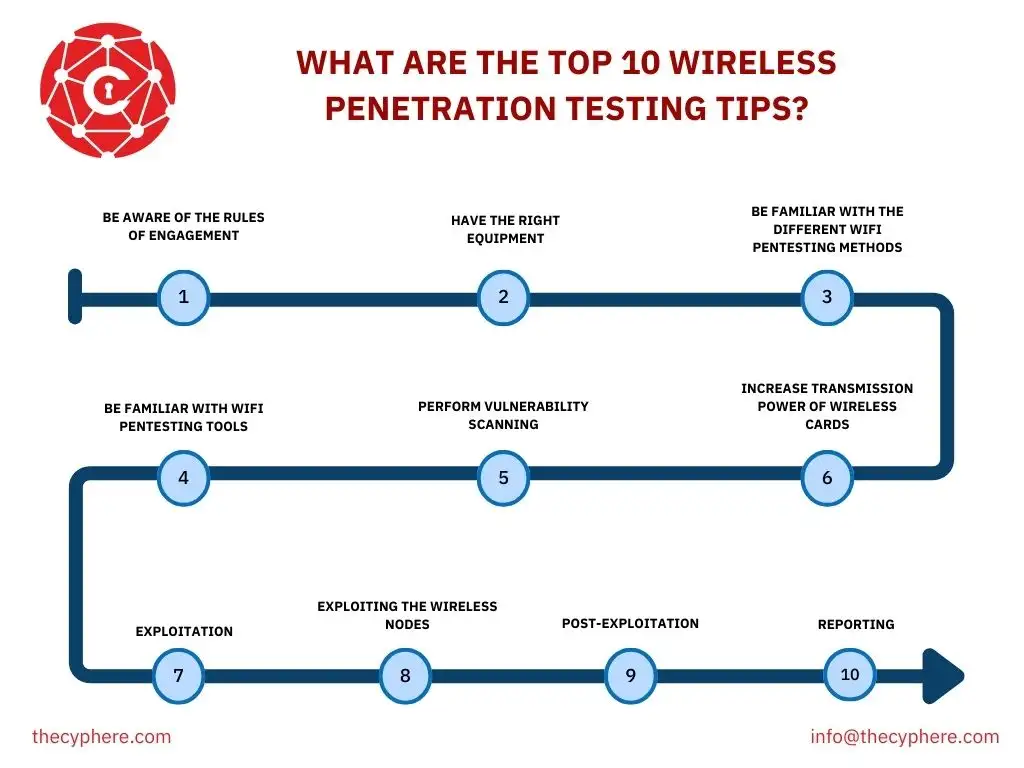
Listed below are the top 10 tips for wireless penetration testing.
- Be aware of the rules of engagement: Wireless security analysts should confirm permission, scope, timing, and limits before any assessment begins.
- Have the right equipment: Wireless security analysts should bring a laptop, antennas, wireless adapters, and capture tools to collect and review wireless signals.
- Be familiar with the different WiFi pentesting methods: Wireless auditors should understand wardriving, rogue access-point detection, segmentation checks, and encryption review before scanning.
- Be familiar with WiFi pentesting tools: Wireless security analysts should choose tools that support wireless discovery, traffic capture, credential testing, and access-point manipulation.
- Perform vulnerability scanning: Wireless assessment teams should run automated scans to flag weak configurations and reduce time spent on manual review.
- Increase transmission power of wireless cards: Wireless security analysts should raise the adapter signal strength on supported devices to extend their capture range during reconnaissance.
- Exploitation: Wireless security engineers should select the attack path based on earlier findings, such as WPS testing, IV capture, handshake collection, or PMKID extraction.
- Exploiting the wireless nodes: Wireless security analysts should check device models and firmware versions to locate vendor-specific weaknesses or outdated software.
- Post-Exploitation: Wireless assessment teams should review reachable assets and data exposure after gaining wireless access to understand the overall impact.
- Reporting: Wireless auditors should document the findings, affected areas, and required fixes so that organisations can reduce wireless risks.
Performing vulnerability scanning is the most important factor to make your wireless network secure because it highlights weak configurations, unsafe access points, and exposure paths before attackers find them. This early visibility helps security teams reduce wireless risks by closing issues that appear during routine scanning.
What are the wireless penetration testing challenges?
Wireless penetration testing challenges describe the technical, legal, and operational barriers we face during the wireless penetration testing process.
Listed below are the challenges we face during wireless penetration testing.
- Expanding device ecosystems: IoT devices, smart sensors, and consumer hardware increase the wireless attack surface because a large portion of these devices use outdated firmware, weak authentication settings, or limited security controls. We handle expanding device ecosystems by analysing each device group separately, reviewing firmware versions, and applying focused testing methods for IoT and embedded systems.
- Unpredictable RF interference: Busy radio environments disrupt packet capture quality because nearby access points, Bluetooth devices, and consumer electronics generate conflicting signals. We handle RF interference by surveying the spectrum early, choosing cleaner channels, adjusting capture positions, and repeating measurements until signal quality stabilises.
- Stronger encryption standards: Modern encryption configurations, such as WPA3, reduce weak-key exposure and require more precise capture conditions for handshake analysis and authentication validation. We handle stronger encryption standards by controlling radio conditions, using accurate capture timing, and employing advanced tools designed for WPA3 and hardened authentication workflows.
- Hidden or unstable SSIDs: Wireless environments contain access points that suppress SSID broadcasts or shift channels frequently, which slows early discovery and extends enumeration time. We handle hidden or unstable SSIDs by tracking beacon patterns, monitoring long-duration scans, and analysing channel movement to uncover suppressed networks safely.
- Cloud-managed wireless controllers: Wireless systems linked to cloud management platforms introduce approval complexity because testing requires consent from both the client and the cloud provider. We handle cloud-managed wireless controllers by validating ownership early, obtaining provider authorisation, and limiting testing steps to actions approved in the written scope.
- Strict legal and regulatory controls: Cybersecurity laws such as the Computer Misuse Act, GDPR, and CCPA restrict wireless testing without signed authorisation, structured data handling, and controlled collection practices. We handle legal and regulatory controls by using signed permissions, protecting temporary captures, and deleting sensitive data once analysis is complete.
- Scope boundaries and testing limits: Wireless environments sit close to neighbouring networks, creating the risk of accidental interaction with out-of-scope access points or IP ranges. We handle scope boundaries by locking all testing activity to the authorised SSIDs, BSSIDs, MAC lists, and IP ranges defined in the scope document.
- Sensitive data handling: Packet captures may contain user identifiers or session metadata, which require controlled access and secure disposal. We handle sensitive data by encrypting captures, restricting access to authorised team members, and securely deleting temporary data after completing the assessment.
- Potential service disruption: Wireless assessments sometimes require actions such as handshake-forcing and lowering Wi-Fi performance during testing. We handle potential service disruption by coordinating timing with the client, limiting high-impact actions, and running critical tests in controlled windows.
- Firmware and vendor diversity: Wireless environments include access points and client devices from multiple vendors and security behaviours that require specific testing methods. We handle firmware and vendor diversity by profiling each device model, checking vulnerability histories, and adapting testing sequences to match each vendor’s behaviour.
Cypher manages these challenges by securing written authorisation, defining every scope boundary, and obtaining cloud-provider approval before technical work begins. We run controlled wireless testing with calibrated tools, safe timing windows, and strict data-handling rules to protect the client’s network while still revealing real weaknesses.
How does Cyphere help secure your wireless network?
Cyphere assess wireless security through continuous partnership, not one-time reporting. As a CREST-accredited provider, we deliver rigorous, quality-focused assessments that go beyond simple compliance exercises.
Your wireless network extends beyond access points. It includes connected clients, servers, and authentication systems. We evaluate the entire attack surface across your wireless infrastructure components. Our methodology adapts to your environment. Hospitals with network access controls require different assessments than enterprises using certificate-based authentication through Active Directory and RADIUS.
We simulate real-world attack paths through adversarial testing. This includes wardriving and sniffing to map signal coverage and detect unencrypted traffic. We review authentication schemes across WEP, WPA-PSK, and certificate-based deployments. We test authentication and authorisation controls for guest, corporate, and vendor networks. Our analysis covers wireless controller and access point hardening, client device misconfiguration identification, and network segmentation verification between guest and internal networks. We also detect and prevent rogue access points that create unauthorised bridges for attackers.
Our wireless penetration testing services provide expert remediation guidance focused on business-critical vulnerabilities. Our partnership includes twelve months of retesting and support at no additional cost.
Can you secure your wireless network on your own?
Yes, you can secure your wireless network on your own through strong encryption, complex passwords, firmware updates, and safe router configuration practices. This setup needs careful changes to default settings and regular maintenance to keep risks low. A cybersecurity services company remains the better option for most businesses because specialists manage wireless risks with greater accuracy, constant monitoring, and solutions shaped around each environment.
How to secure your wireless network?
Listed below are the actions to secure your wireless network.
- Enable WPA3 or WPA2 encryption: You should enable WPA3 or WPA2 encryption to stop anyone from capturing your Wi-Fi traffic and viewing the information travelling between your devices and the router.
- Change default router credentials: You should change the default router username and password to block attackers who try to log in using factory-set credentials.
- Update wireless firmware: You should update the router and access-point firmware to remove known security flaws that attackers exploit.
- Segment guest access: You should segment guest Wi-Fi into a separate network so visitors cannot reach internal systems or business data.
- Monitor connected devices: You should monitor all devices connected to your Wi-Fi to identify unknown equipment and flag unusual activity.
You should have a clear understanding of wireless security concepts such as WPA3/WPA2 encryption, router administration, strong password practices, firmware management, and basic firewall rules. You should have enough technical awareness to change default credentials, update router firmware, configure encryption correctly, and apply settings (SSID changes, MAC filtering).